Română
A working setup for designers who want strategy artifacts that survive past the session — the layout, the plugins that earn their place, and the closing argument about owning your tools.
Used to run brand strategy in FigJam for my clients. Every project needed a new board, and every new board I had to rebuilt the same scaffolding from scratch. In between FigJam and the actual research, there was a row of browser tabs I couldn't bring myself to close: the brief in one, the client's old website in another, my own framework templates in a third. By the end of a project the workspace was a simply a mess. Stopped trusting myself in terms of bringing clarity to the client since I could barely had any in my workflow.
As a long time Obsidian user I decided to try Obsidian Canvas. I'd defend the move against any FigJam loyalist on one specific argument, which I'll get to at the end. The setup first.
What this workflow is
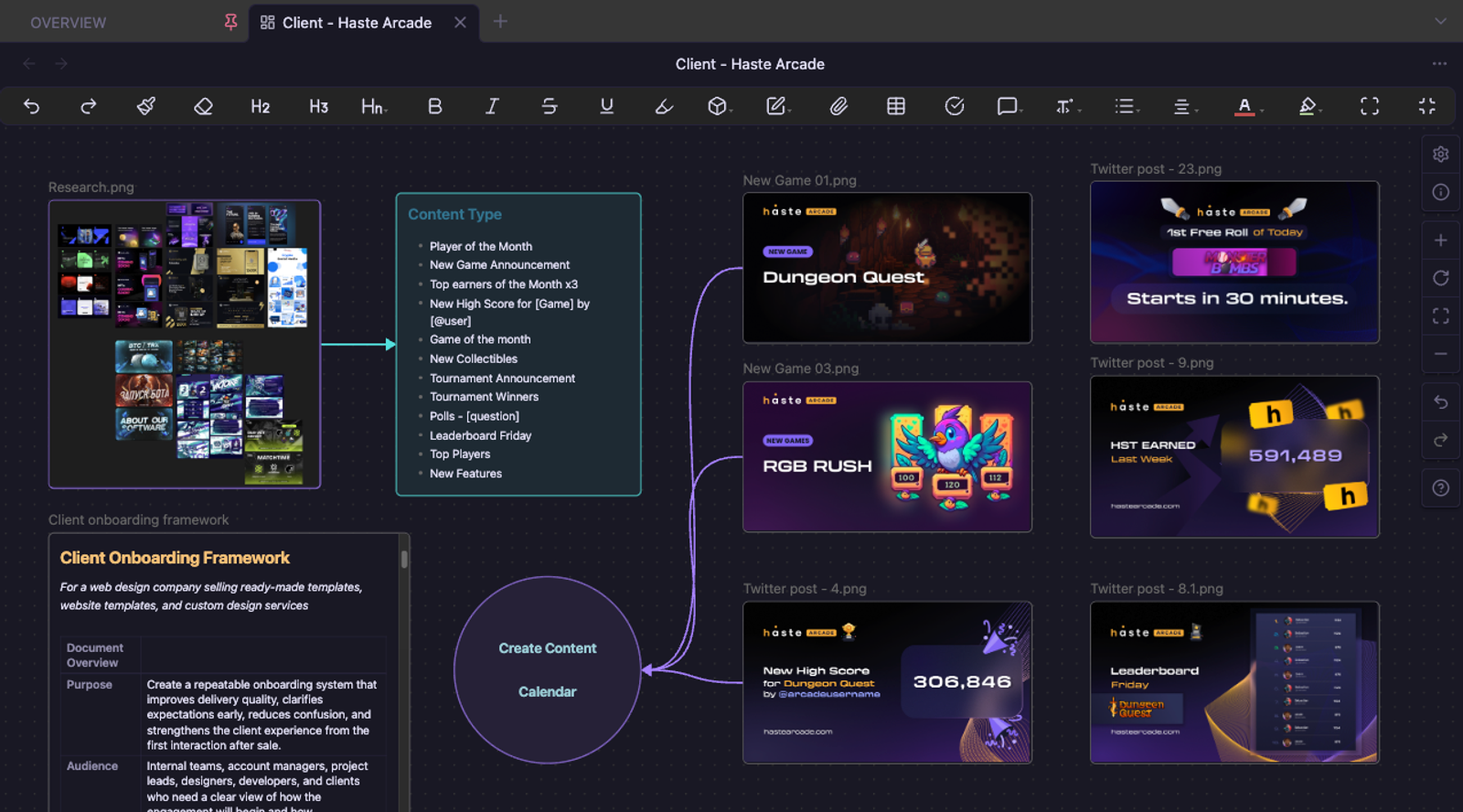
The.canvas file in Obsidian is a spatial board. Each node can be an embedded markdown file from the same vault, so basically a document, an image, a link, or free-floating text. You can group them, color-code them, link them, lay them out on an infinite plane. None of that is special, FigJam and Miro do the same thing.
The key difference is that every node lives inside my vault, which is basically a folder with documents that live inside your computer. The brief, for example sits, in clients/[name]/brief.md. Discovery call notes are in clients/[name]/discovery.md. Brand framework templates in wiki/templates/. So on. When I drop them into a canvas they aren't just copied text I had to take from somewhere else. They're the same file, just displayed in the canvas so you can easily edit it on the canvas, then the source updates. Or edit the source, then the canvas updates.
How I structure out a typical canvas
Looks different per project but the structure is always the same.
On the top-left: the brief, if I have one. When I don't (and that's most of the time unfortunately), the top-left node becomes "what they have now as a brand," with links and screenshots of the client's existing website, Instagram grid, any printed assets they sent over. Even when none of it is coherent there are always patterns I can pull from, which can be used to intuitively deduce what the client wants. So those patterns become the second node: "what they're already doing, even if they don't know it."
Below that goes the mood-board, which is a collection of images from Pinterest, Behance or other references I saved through Eagle from just browsing that might come in handy now. Built around what the brand aspires to be perceived as, not what they currently have available. The aspiration usually lives a few levels up from where they're operating, so its a nice in between solution that still feels like them but elevated. For example: a small clinic that wants to read as a polished medical brand, or a neighborhood café that wants to read like a third-wave roaster. I pull references from the industry standard for that more polished version, tagged so I can sort by mood, palette, or typographic family later on. Here the Paste Image Rename plugin comes in handy.
Moving forward with the set-up, to the right sits the strategy column. This is where the embedded templates live. These are usually discovery call notes, brand framework prompts, the positioning questions I'm asking myself before committing to a direction. Because they're embedded as live nodes I can easily edit them inside the canvas without leaving it. So when I have to update a question in my master discovery template it automatically shows up in every canvas that embeds it. That's the best part, that FigJam structurally can't do.
Below the strategy column, I leave a loose area for content ideas. It helps me a lot to brainstorm how the applications of the brand will look like, through digital content, social posts so on. Even if its something that the client didn't requested. Also the canvas isn't only for client work. It's also where I generate content for my own studio, so it's pretty handy to keep the mockups we use for posting on our own social platforms in one place linked to each project. Some of my blog post ideas start from something I noticed on a strategy canvas first.
The plugins that make it easier
Here are six of the main plugins I use, in order of how often they have helped me:
- Advanced Canvas - Adds presentation mode, node linking, and grouping that the basic Obsidian doesn't have. With the presentation mode I can walk a client through a canvas instead of exporting slides.
- Editing Toolbar - Gives me formatting controls for inline notes without breaking flow.
- Dataview - Lets me query notes by tags. Starting a new medical-niche project? I can pull every moodboard I've ever made for a medical client into one view.
- Mindmap - This is useful for early discovery, when I'm still mapping relationships between brand attributes and I'm not ready to commit to a layout.
- Paste Image Rename - It's a small plugin but saves me from a folder full of
Pasted image 20260411182634.pngclutter. - Excalidraw - I'm still testing it, trying to learn how to use it best. But so far it's promising for diagrams I'd otherwise reach for Figma to make.
How can you incorporate canvas view with a wiki llm
Combining this system with the Andrej Karpathy wiki llm philosophy it's truly a power use.
My wiki has right now a section per client niche (dental, wellness, restaurants, law firms), and each niche page has compliance notes, common pain points, trust signals, recommended deliverables. Drop a niche page into a canvas and the backlinks are still live. I can see every other project that has related to that niche, every claim I've made about it in past content, every compliance flag I've already had to navigate.
Same applies for sources. If I've read a chapter of Ogilvy on testing landing pages, that chapter is a .md file in wiki/sources/ connected to every other information in my wiki system. When I pull it into a canvas and reference it inline while making the call, the canvas isn't a one-off room. A FigJam board is a closed workspace. An Obsidian canvas is a just window into the rest of my vault. Helping me visualize and organize myself better, improving my input as a designer.
But what does it do badly?
There are three things I can name.
At the end of the day it's just a planning tool. The actual design work happens elsewhere, in other programs. You still have to open Figma for layout, Affinity for files, Canvid for video, etc. I would love a canvas that is the design tool, something that holds brand assets, design tokens, and strategy in the same place. No tool does that yet. Would be amazing to see it inside an existing tool, with branding built into the document itself rather than imported every time.
Presenting from the canvas works in person, on my own screen. On a shared screen it gets clunkier. The Advanced Canvas presentation mode helps a bit, but I still default to a separate deck for high-stakes client meetings.
No native commenting either. Work around it by giving clients a dedicated note inside their canvas where they can leave inline feedback, but it's less ergonomic than FigJam's sticky comments.
Why I'd defend this against "just use FigJam"
Truth be told you don't really own the files you make in FigJam or Figma. If you can't afford the subscription anymore, in case they raise the price. Or Figma gets acquired and rolled into something you don't want to use, then the company simply disappears. Your strategy work goes with it, every brand framework you built, every client moodboard, every research synthesis.
With Obsidian the files live on my machine as plain markdown and .canvas JSON. that I own, indefinitely. They will survive any company decision. If I choose to close my studio tomorrow and reopen it in five years, the vault is still readable on whatever computer I'm using. It's a workflow that can grow with you as a freelancer, as a studio, into whatever your work becomes next.
Also as another tip in better ownership over your work, something I do for my most important Figma files is that I do the same backup, but exporting them to Penpot. Same logic. Getting into the habit of owning your files protects you in the long run. And designers don't think about it enough.